Get some context.
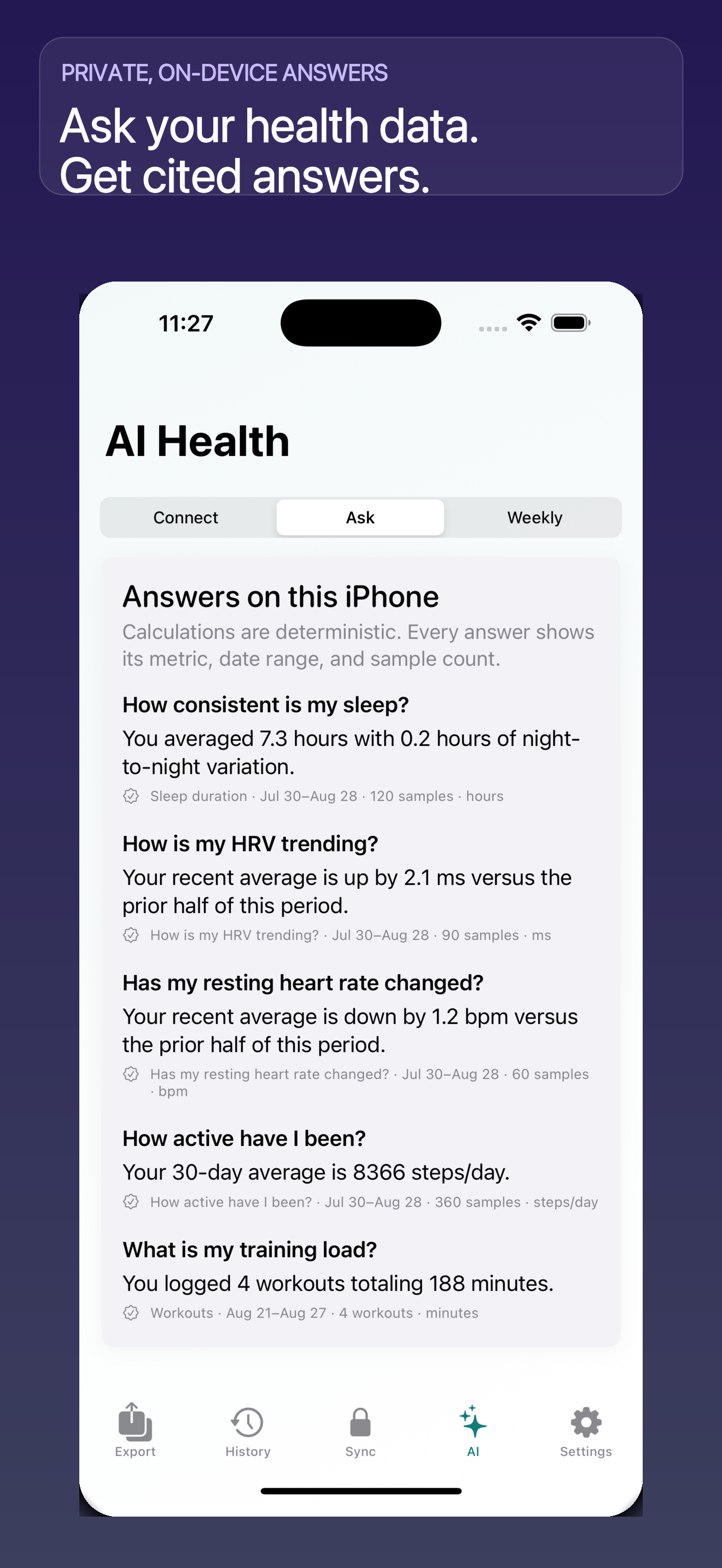
Review on-device answers about sleep, activity and heart rate, with dates, metrics and sample counts.
Get answers on your iPhone. Explore your history on Mac. Bring your data to ChatGPT or Claude.
Buy once. Use on iPhone and Mac.
Optional Pro and external AI fees are separate.
Understand & export
your health data.
Explore your history
and see the trends.
Bring an export to
ChatGPT or Claude.
ONE HISTORY. THREE WAYS TO USE IT.
Choose which Apple Health data the app can access. Get answers on your iPhone, then decide whether to take your history into another workflow.
Review on-device answers about sleep, activity and heart rate, with dates, metrics and sample counts.
Create CSV, JSON or XML files for spreadsheets, Mac analysis and your own tools.
Stay on your iPhone, import an XML export on Mac, or attach a JSON summary to your AI chat.
Bring an Apple Health XML export from your iPhone to your Mac. Explore your history across days, months and years—with room to see the patterns.

Switch between timeframes to review changes in your recorded metrics.
Import and explore on your Mac. Local AI is available with Ollama or LM Studio setup.
Use the Mac app’s analysis tools or prepare an export for your preferred AI workflow.
A useful export carries dates, values and units. Bring that context into your next conversation, and check the answer against the data.
“How has my sleep changed this month?”
“Compare my active days with my rest days.”
“What’s missing from this data?”
EXAMPLE QUESTIONS / ANSWERS DEPEND ON YOUR DATA AND TOOL
| Date | Asleep / hours |
|---|---|
| 2026-09-01 | 7.2 |
| 2026-09-02 | 6.8 |
| 2026-09-03 | 7.5 |
Readable fields. Dates attached.
A file you can inspect and reuse.
{
  "formatVersion": "ai-preset-v1",
  "sections": {
    "sleep": {
      "days": [
        { "date": "2026-09-01",
          "asleep_hours": 7.2 },
        { "date": "2026-09-02",
          "asleep_hours": 6.8 },
        { "date": "2026-09-03",
          "asleep_hours": 7.5 }
      ]
    }
  }
}
Use on-device answers with dates, metrics and sample counts.
Create CSV, JSON or XML files for your own tools and analysis.
Import your XML export into the Mac app to review trends.
Prepare JSON summaries and share them with your chosen tool.
No subscription required
for these base features.
US pricing shown. Confirm your local price in the App Store. One purchase includes iPhone and Mac; install each app separately.
Optional Pro is $3.99/month or $24.99/year (US). Check the in-app plan for included features. Your external AI provider may charge separately.
You create a file in Health Data, then attach it to your AI conversation yourself. This gives you control over what you share. File support and size limits depend on your AI provider and plan.
Exports are prepared locally. On-device answers stay on your iPhone. When you share a file or choose cloud AI or cloud sync, the selected data goes to that destination. Read the privacy policy.
Apple’s built-in export gives you an XML archive. Health Data adds CSV and JSON exports, AI summary files, on-device answers, and a Mac analysis workflow. If you only need to convert an existing XML file, try the free browser converter.
You can export files and use on-device answers on iPhone with the base app. Mac analysis is an additional path using the separately installed Mac app. Pro is optional for built-in cloud AI and sync workflows.